
Introduction
In the world of machine learning and artificial intelligence, working with unstructured data often involves converting textual information into vector representations, or embeddings. These embeddings power search, recommendation engines, and natural language understanding tasks. By transforming textual data into numerical representations, we can leverage vector databases such as Pinecone, Weaviate, or Redis for fast similarity search and other advanced analytics.
One of the easiest ways to generate high-quality text embeddings is by using the OpenAI API. In this post, we’ll walk through how to generate embeddings for product or document data and store the results in a MongoDB collection for further use.
Why Use Text Embeddings?
Text embeddings are dense vector representations of text that capture its semantic meaning. Instead of dealing with raw text, embeddings allow algorithms to process the contextual meaning of words and phrases efficiently. This is especially useful for applications such as:
- Semantic search: Finding similar documents or products.
- Recommendation systems: Personalizing user experiences.
- Clustering and classification: Organizing data into meaningful groups.
Getting Started with OpenAI Embeddings
To generate embeddings with OpenAI, you'll need to use the text-embedding-3-small (or other relevant) model provided by the API. Below is an example implementation in Python.
Setting Up the OpenAI API Client
from openai import OpenAI
def get_openai_client():
"""Returns an OpenAI client instance."""
global client
if not client:
client = OpenAI(api_key=config("OPENAI_API_KEY"))
return client
def get_embedding(text, model="text-embedding-3-small"):
try:
client = get_openai_client()
ret = client.embeddings.create(input=[text], model=model)
embedding = ret.data[0].embedding
except Exception as e:
return None
return embedding
The get_embedding function sends a text input to OpenAI’s embedding model and returns a vector representation. This embedding can then be used in downstream applications.
Example OpenAI API Response
The OpenAI API provides a structured JSON response. Here’s an example:
{
  "object": "list",
  "data": [
    {
      "object": "embedding",
      "index": 0,
      "embedding": [
        -0.006929283495992422,
        -0.005336422007530928,
        ... (omitted for spacing)
        -4.547132266452536e-05,
        -0.024047505110502243
      ]
    }
  ],
  "model": "text-embedding-3-small",
  "usage": {
    "prompt_tokens": 5,
    "total_tokens": 5
  }
}
Generating Embeddings for MongoDB Documents
A practical use case is to generate embeddings for product attributes stored in a MongoDB collection. The first step is to convert product objects into a text prompt format.
Converting Product Data to Text Prompts
def generate_embeddings_text(product, fields) -> str:
    data = ""
    for field in fields:
        if field in product and product.get(field, ''):
            data += f"{field.upper()}: {product[field]}\n"
    return data
This function formats the selected product fields into a structured text prompt that can be passed to the embedding model.
Processing MongoDB Documents
The following example demonstrates how to fetch product data from a MongoDB collection, generate embeddings, and store the results back into the database:
fields = ['name', 'description', ...]
for doc in pymongo_db['products'].find():
    embedding_data = generate_embeddings_text(doc, fields)
    embedding_openai = get_embedding(embedding_data)
    pymongo_db['embeddings'].update_one(
        {'sku': doc['sku']},
        {"$set": {
            'sku': doc['sku'],
            'embedding': embedding_openai,
            'updated_at': datetime.now()
        }},
        upsert=True
    )
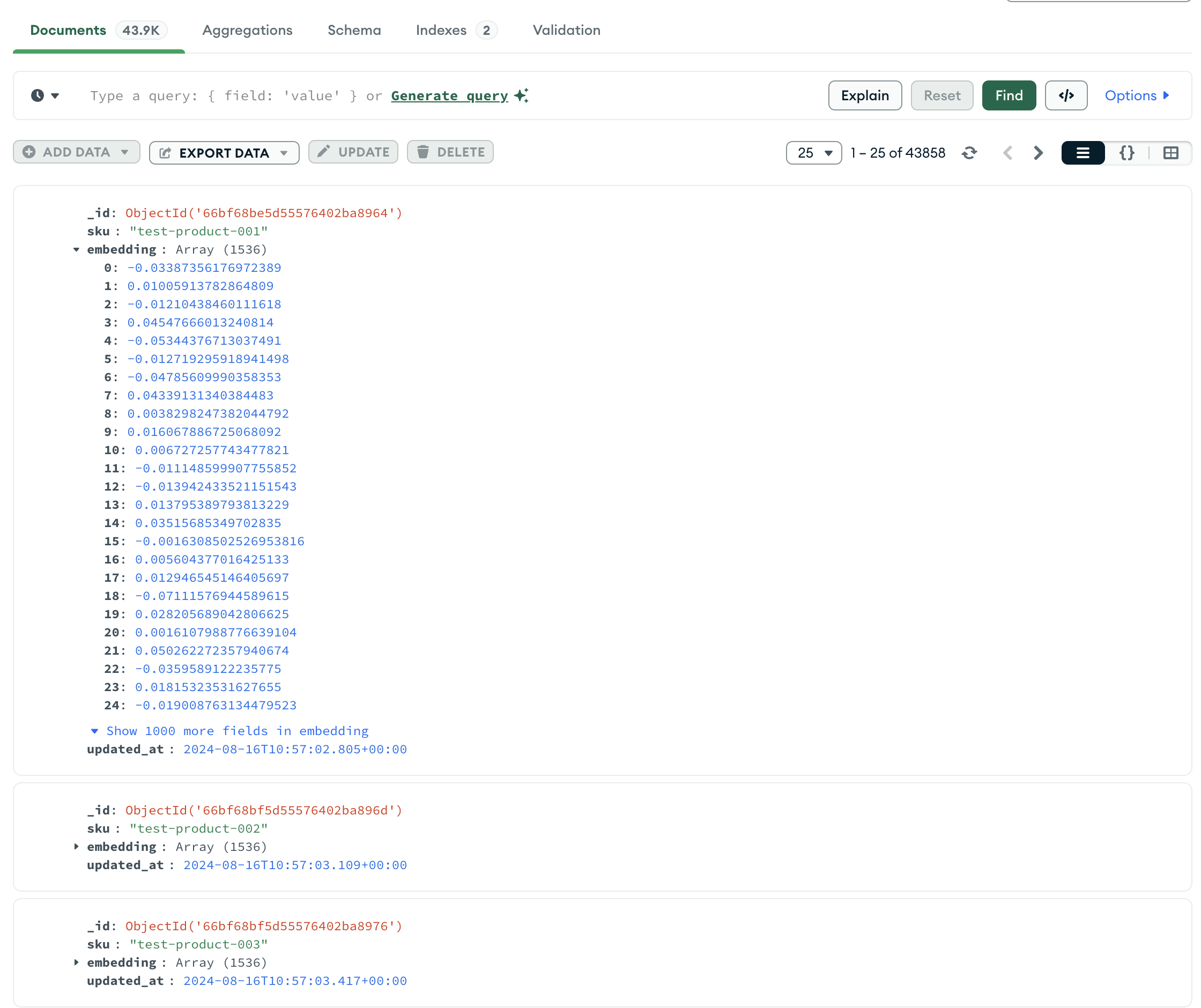
This pipeline transforms product attributes into embeddings and updates the results in a MongoDB collection. The collection embeddings will contain each product’s SKU and its corresponding embedding vector.
Pricing of OpenAI Embeddings
As of the time of writing, the cost of generating embeddings using OpenAI’s text-embedding-3-small model is $0.020 per 1M tokens. To estimate the cost of processing 1 million products, consider the average size of the product data:
Example Calculation:
- If each product's attributes average 1 KB of text, then 1M products ≈ 1 billion tokens.
- Total cost = 0.020 x (1 billion tokens / 1M tokens) ≈ $20.
For larger datasets, the cost remains competitive, given the high quality and versatility of OpenAI’s embeddings.
Conclusion
Generating embeddings with OpenAI’s API is a simple yet powerful way to work with textual data in modern machine learning applications. By converting structured or unstructured data into embeddings, you unlock capabilities like semantic search, personalized recommendations, and clustering.
In this post, we’ve demonstrated how to integrate OpenAI’s embedding API into a Python pipeline, process MongoDB documents, and manage costs effectively. This workflow can be adapted to various use cases, from e-commerce to document management systems.
Start experimenting with OpenAI embeddings today and transform the way you work with textual data!